Manyfast 200%
Wireframe generation tips to save your credits
In Manyfast, your Feature Spec and User Flow become the prompt for generating wireframes. Here are three tips to improve the quality of wireframes you create with Manyfast.
Hello, this is Team Manyfast.
IWith this update, we finally introduced the long-awaited wireframe feature.
During the development process, the Manyfast planning team ran countless experiments.
How can we create wireframes that are more useful and more satisfying with Manyfast?
Today, we’re sharing the tips we learned through many trials, errors🥲 and credits🪙!
💡 Tip 1. Obviously, Start with a Solid Feature Spec
It may sound obvious, but wireframes are created based on the Feature Spec.
That means the level of detail in each feature directly affects the quality of the wireframe.
Wireframes often include various dummy texts.
If your Feature Spec includes specific examples, policies, or conditions, AI can use them as context and create a much more accurate result.
Let’s look at one example.
Here’s how the wireframe changes when you only write a simple “Make a Reservation” item versus when you write detailed policies and conditions related to that reservation.
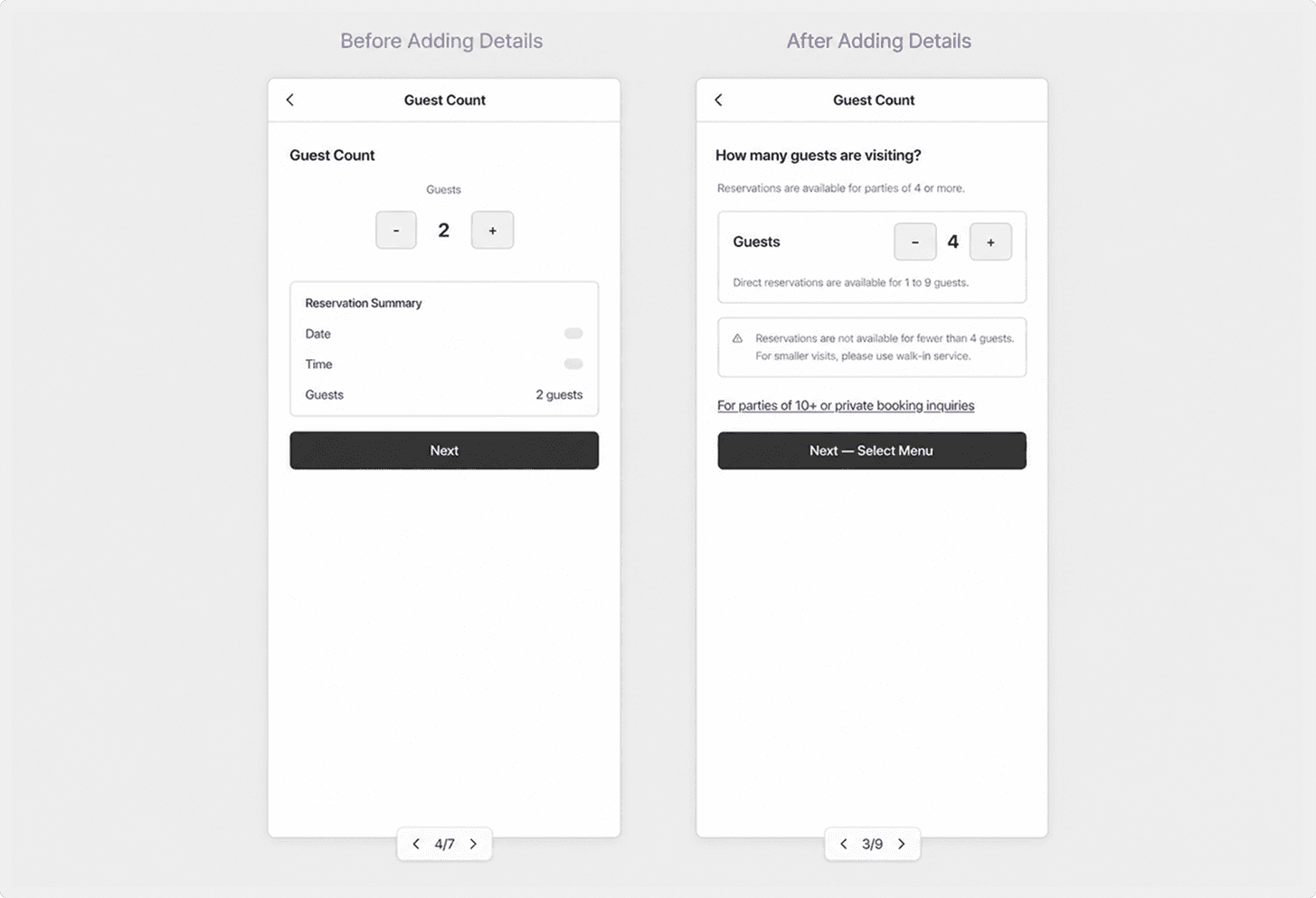
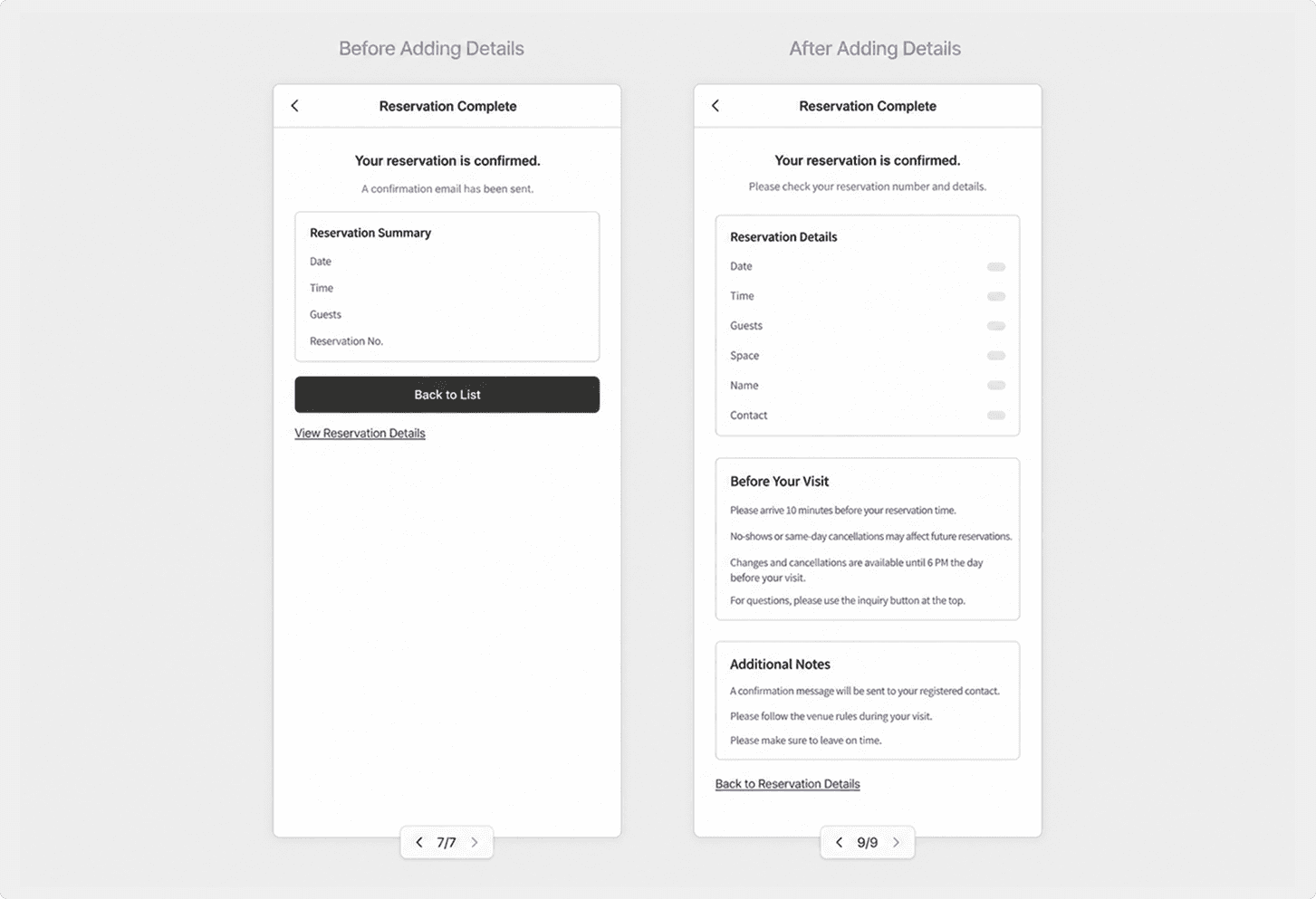
❌ Only writing a single “Make a Reservation” item:
The wireframe comes out as a basic structure without any helpful guidance text.✅ Writing detailed policies such as minimum participants and no-show rules:
Guidance text that reflects those policies is automatically generated.
The wireframe can still be generated even if not every detail is perfectly written.
But if there are parts that must work in a specific way, make sure to define them in the Feature Spec.
Writing a detailed Feature Spec is the most reliable way to reduce rework.
💡 Tip 2. If You Want to Change the Flow, Check the User Flow
When AI creates a User Flow, do you sometimes think, “That looks fine,” and move on?
Once you convert it into a wireframe, issues that were missed in the User Flow often become visible.
Let’s use a sign-up flow as an example.
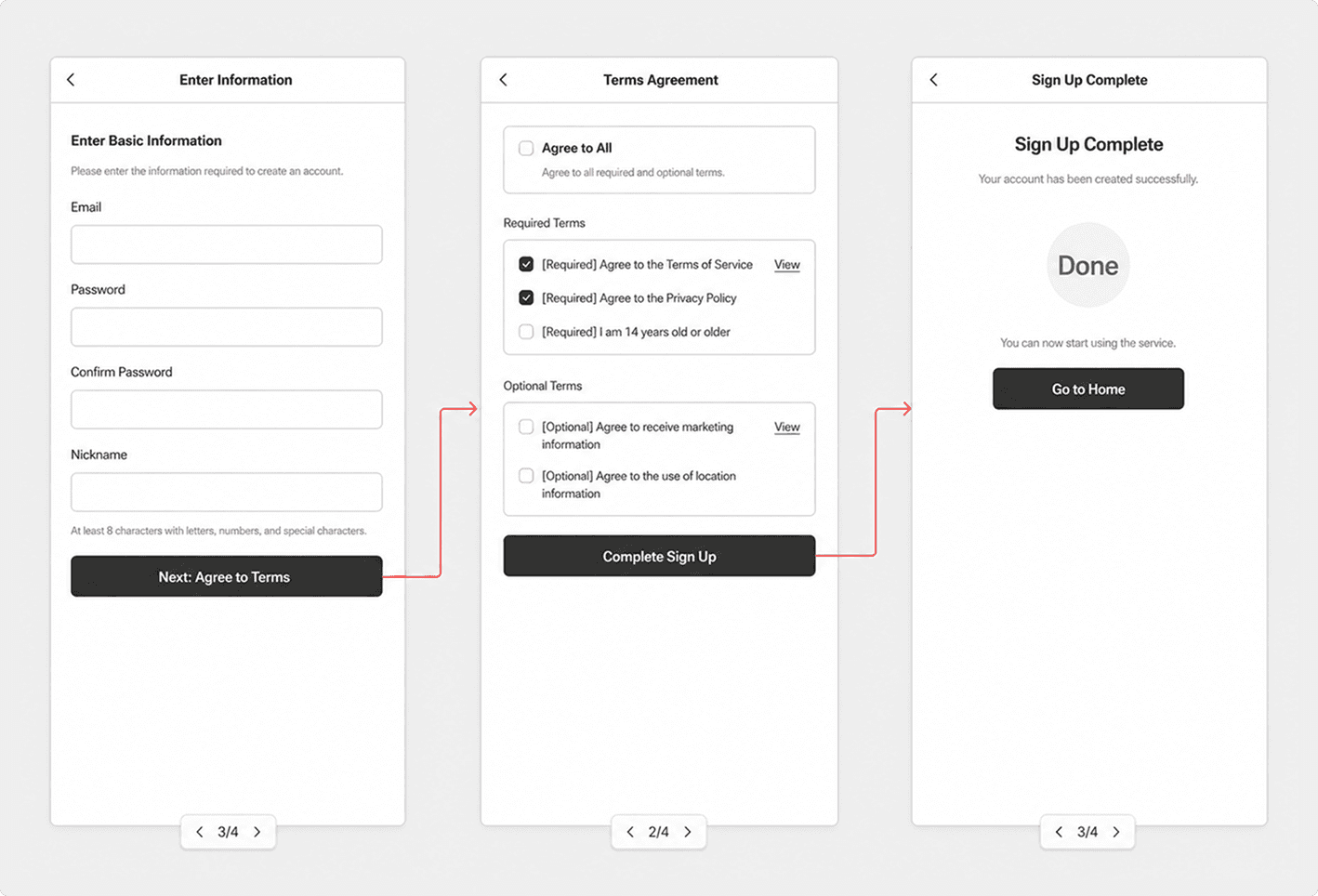
After entering all the sign-up information and moving to the next page, a “Terms Agreement” page appears.
But that wasn’t the intended flow.
The intention was to include a “Terms Agreement” section at the end of the information input page, and only show the full terms when the user taps “View Details.”
In cases like this, check the User Flow!
Problem : “Sign-up” page → “Terms Agreement” page → “Sign-up Complete” page
In this flow, users must go through a separate terms agreement page before they can complete sign-up.
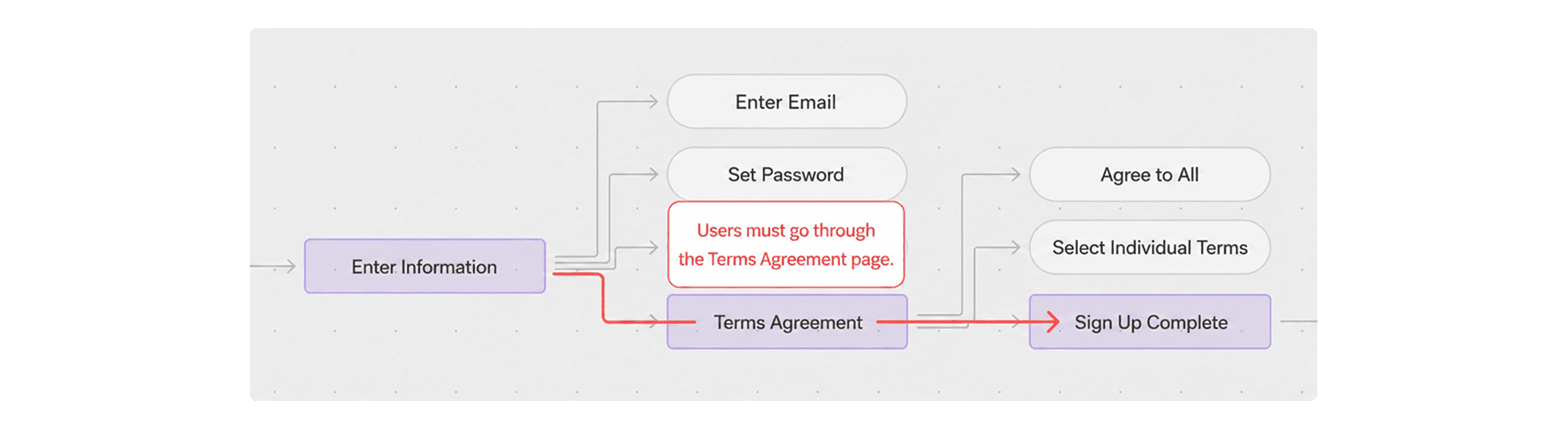
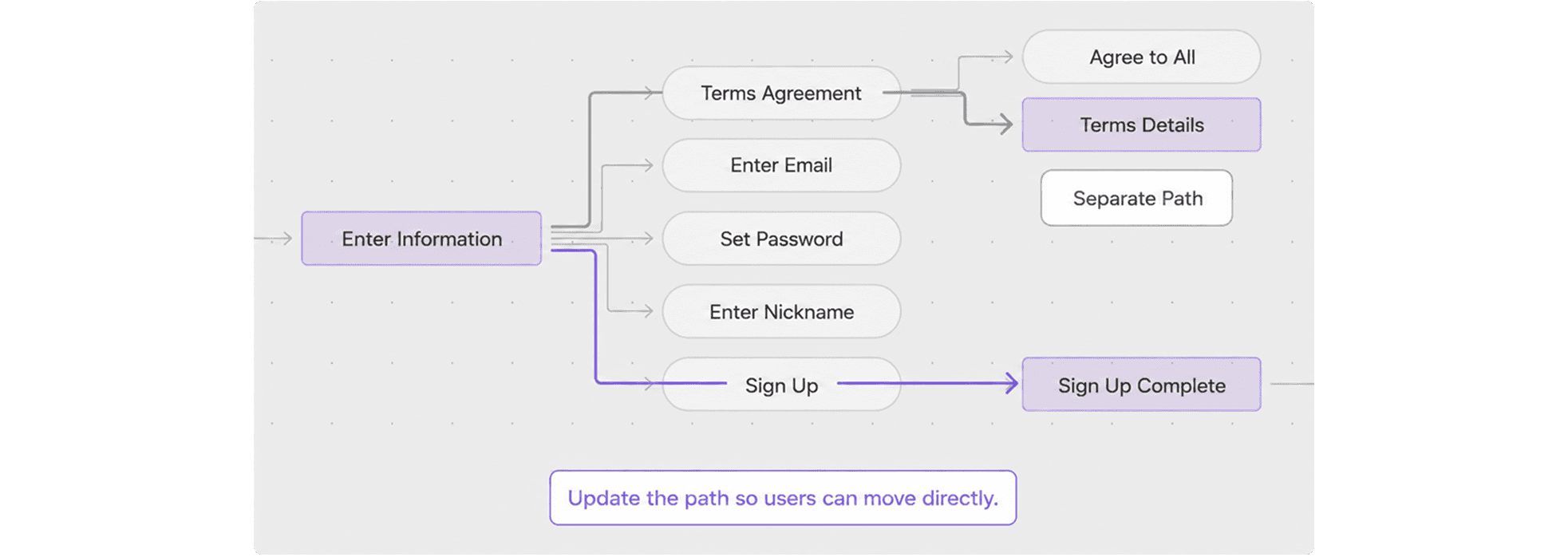
Revised Flow : 'Sign-up' page → 1. 'Terms Details' page / 2. 'Sign Up Complete' page
The information input page is connected directly to the sign-up complete page.
'Terms Details' is clearly defined as a detail page and separated into a separate path.
After modifying the User Flow and regenerating the wireframe, the flow works as intended.
Users move directly to the sign-up complete page, while the terms details page is separated into a different path.
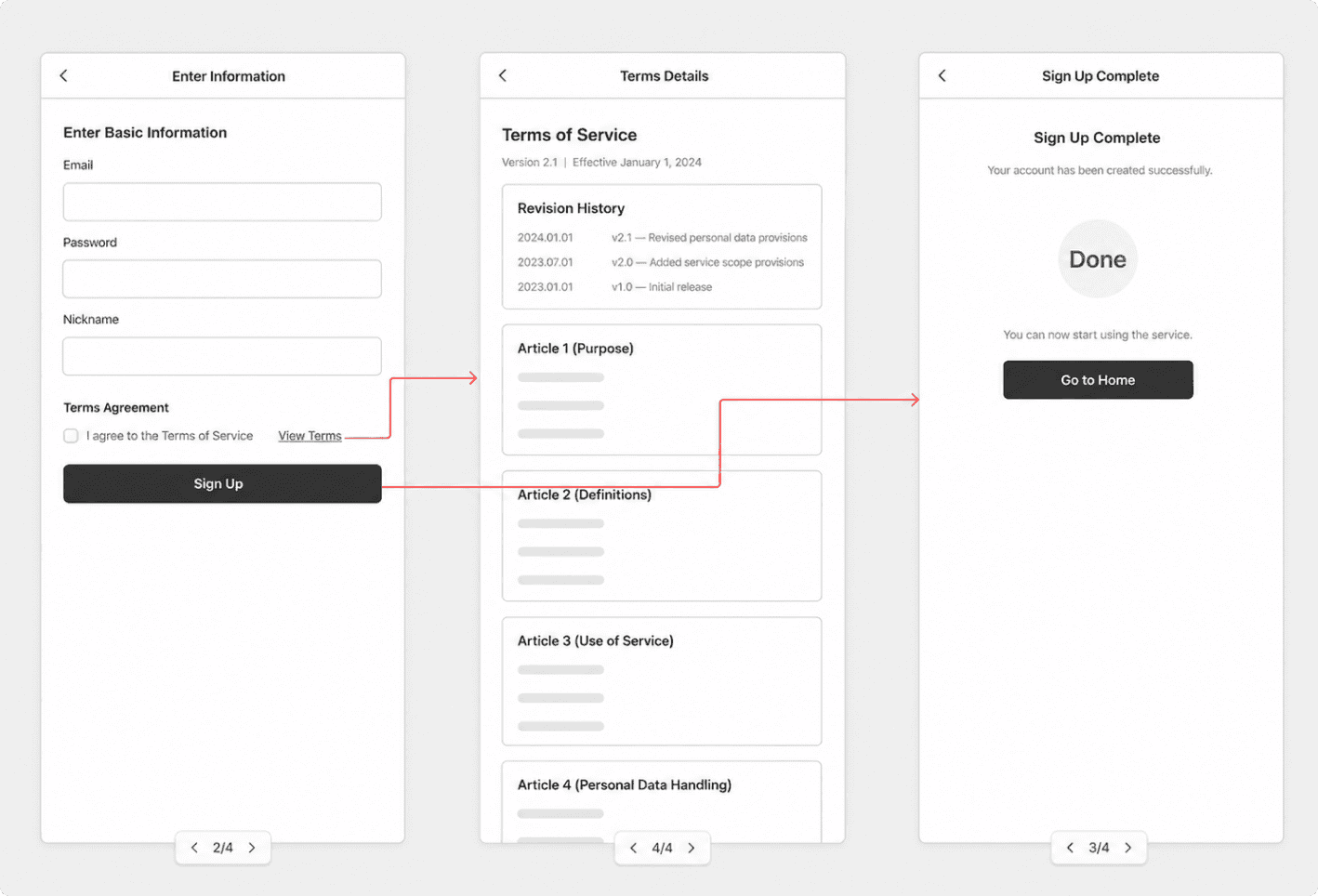
The key is to use the wireframe to spot awkward flows, then refine the User Flow accordingly.
⚠️ Note
Because this is an AI-based workflow, there were some limitations in keeping every page visually consistent.
For example, pages with different states, such as a logged-in home screen and a logged-out home screen, or pages showing the same data in different formats, such as a calendar view and a list view, sometimes looked like completely different pages.
If having too many of these pages makes the overall flow harder to understand, combining them into a single page can also be a good option.
💡 Tip 3. Additional Input Works Better When Written This Way
When Generating the Full Wireframe : Specify the UX Writing Tone
Requests related to UX writing are reflected especially well in the additional input field.
ou can specify things like:
Overall copy tone : friendly, formal, easy for beginners to understand, or written for experts
Examples you want included : In this app, users can book services such as regular home cleaning, move-in cleaning, and office cleaning.
When Editing a Page: Layout Revision Do & Don’t
When you’re not satisfied with the layout, it is much more effective to write your request as clear instructions rather than as a rough conversational request.
Don't ❌
“Remove the intro section in the middle and the last section.”
“Make the menu feel more spacious.”
Do ✅
“Structure the page around the main banner, brand introduction, and key product list. Do not include profile information on this page.”
“Include images in the menu list cards, and arrange the cards in one large single-column layout.”
Can you see the difference?
Instead of giving instructions vaguely within context, describe the specific outcome you want, like the examples in the Do section.
That will help AI generate a more accurate result.
To Sum Up
In the end, the quality of a wireframe is not determined only at the wireframe stage.
It starts before that.
Write the Feature Spec in detail.
Review the User Flow carefully.
Write the prompt for generation as specific instructions.
If you take care of these three things, the quality of your wireframes will improve significantly.
These tips come from the many credits we spent while testing the feature, so we hope they help you get more out of Manyfast’s wireframe feature!
Back to list
