So, What Is AX? The Difference Between Using AI and Transforming Work

Everyone says companies that don't use AI at work will fall behind — so our team has been using AI for quite a while now.
We used AI to summarize meeting notes, draft product plans, research materials, organize customer feedback...
Once we brought AI into our work, everything felt faster. We spent less time staring at blank documents, and no one had to re-listen to recordings just to figure out what was discussed in a meeting.
"We're clearly doing AI right!"
That's what we believed for a while. At least until someone asked this question:
"We keep using AI like this — so why does it feel like our to-do list keeps growing..?"
They had a point.
AI wrote our meeting notes, but we still had to dig up the actual decisions ourselves. ChatGPT drafted our product plans, but our developers couldn't understand those drafts right away. Customer feedback got organized, but a human still had to judge and decide what to build first.
AI was clearly producing output, and we believed that meant we were working faster. But because that output never flowed naturally into the next task, our working hours never actually changed.
Meeting notes stayed meeting notes, drafts stayed drafts, and the organized feedback just sat there waiting for someone to interpret it.
In the end, we were taking what AI produced and reading it again, fixing it again, and moving it into yet another document.
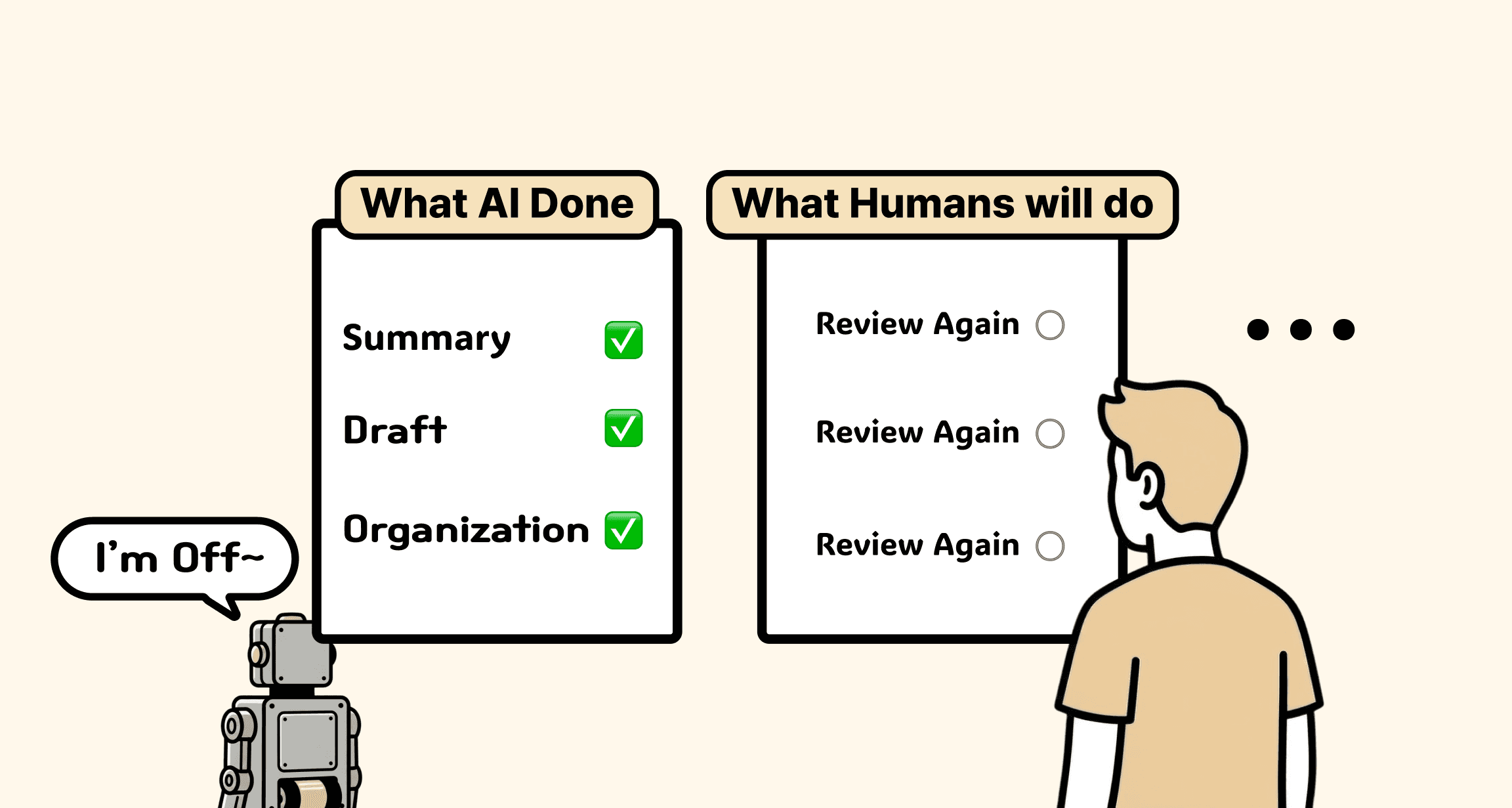
Even with AI, human organizing never ends. <Image: Generated with ChatGPT
According to BCG's September 2025 report, "The Widening AI Value Gap" (Build for the Future 2025 Global Study), out of more than 1,250 global companies surveyed, only about 5% had built the capabilities to generate real value from AI — while 60% saw almost no measurable impact.
Getting into that 5% — in other words, the key to real results — isn't AI adoption. It's AI transformation.
The difference between adopting AI and AX — let's dig in.
What Is AX?
👉 AX (AI Transformation): going beyond simply adopting AI technology, and redesigning how an organization works, makes decisions, and runs its business for an environment where AI exists.
To understand AX, it helps to compare it with DX — Digital Transformation — which came before it.
DX is described as a strategic shift that applies digital technology across an organization to modernize its processes, products, operations, and technical infrastructure. Put simply, it was the work of lifting business that ran on paper, Excel, handwriting, and offline processes onto digital systems.
Everyday examples: introducing electronic approvals, storing customer data in a CRM, moving team collaboration onto messengers and project management tools, keeping your team's data inside collaboration tools so it's accessible from anywhere — that shift is what DX looks like.
So what makes AX different?
According to IBM, AI Transformation — AX — is the strategic activity of integrating AI into a company's operations, products, and services to drive innovation, efficiency, and growth. And beyond simply adopting AI technology, it requires changes in workflows and organizational culture as well.
<Source: What is AI transformation? : IBM>
Let me put it more simply.
If DX was the process of lifting work onto digital systems,
AX is closer to redesigning work so that AI can actually do it.
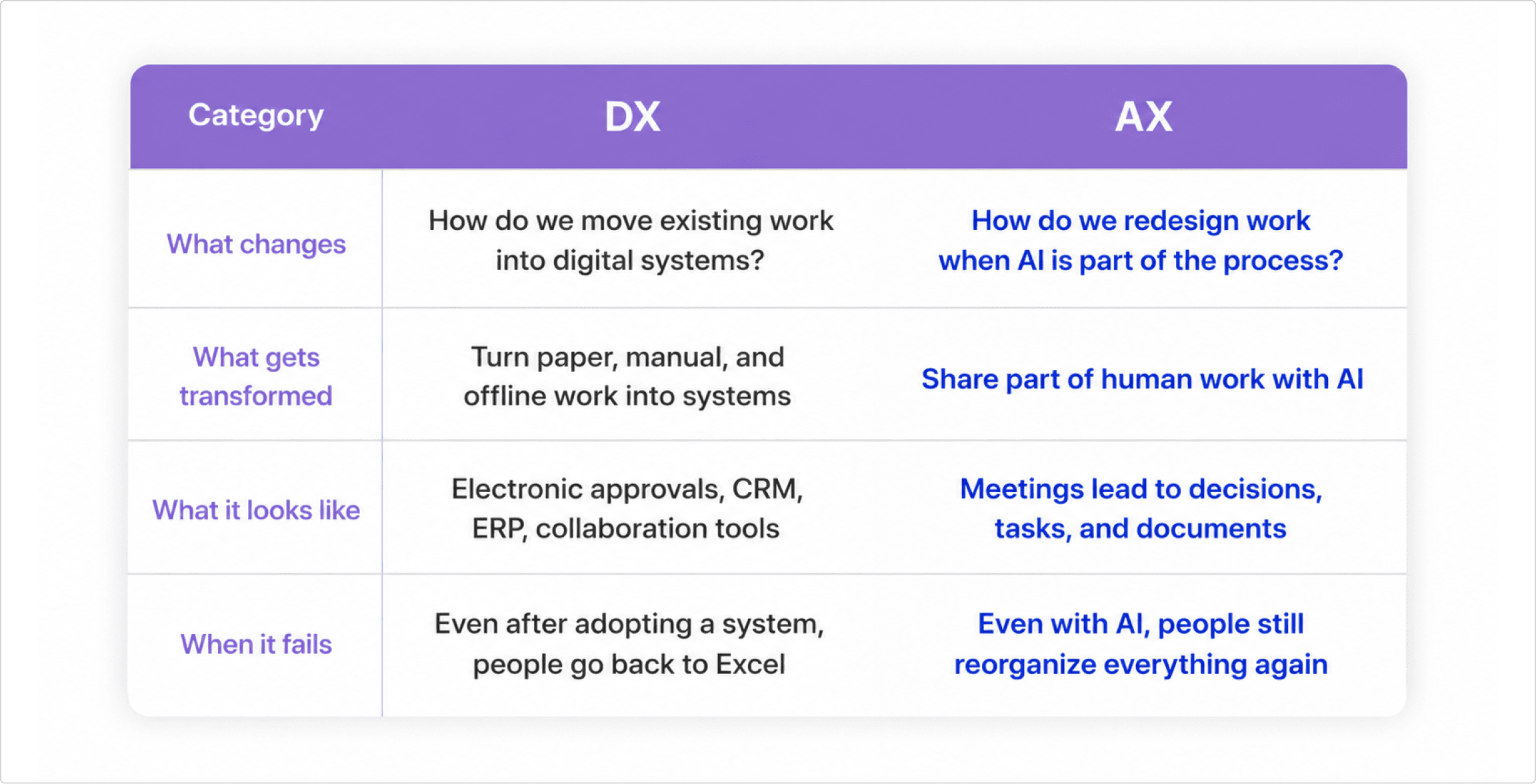
So if we had to define AX in a single sentence, it would be this:
"AX is not about using AI a lot at work — it's about redesigning work in a way that AI can work."
Why Work Stays the Same Even When You Use AI
Like our team, why do so many organizations use AI yet feel like nothing has really changed?
The reason is simple. They've "attached" AI to their work, but the flow of work itself has stayed the same.
This gap shows up most clearly in teams that build products.
That's because product planning isn't just writing documents.
It's the work of turning customer needs and meeting ideas into countless next actions — feature scope, policy conditions, screen flows, development issues — which is why the gap shows up so much more sharply.
Let me give you an example. Imagine a team adopts an AI meeting summarization tool.
The moment a meeting ends, AI produces a pretty convincing summary.
Attendees, key discussion points, decisions, even next actions — all organized.
Everything sits neatly in one document, so it feels convenient and efficient.
Before, someone had to re-listen to the meeting, clean up their notes, and share them with attendees — so looking at this task alone, adopting AI is remarkably efficient.
But the next day, messages like these pop up in Slack:
"Did we actually decide to build this feature yesterday?"
"Is that going in this week, or did we push it to later?"
"Are we going with design A or design B?"
"Who was supposed to create the dev issue for this?"
"Who's updating the PRD based on what we decided?"
The meeting notes exist — but product planning still can't move to the next step.
It's not that AI failed at summarizing. The problem is that the summarized information wasn't organized to flow into the next deliverable of product planning.
What comes out of a meeting shouldn't end as a mere record.
It needs to be broken down: which requirements to reflect, how far the feature scope goes, what was put on hold, and which conditions developers need to verify.
Only then can meeting notes become more than a summary — they become the starting point that leads to the PRD, feature specs, user flows, and development issues.
This shows that what matters in product planning isn't producing plausible sentences quickly.
What matters is a structure the whole team can read the same way — one that lets designers map out screen flows and developers judge implementation scope and edge conditions.
The reason AI clearly made work faster yet the team's way of working barely changed is that AI's output never flowed naturally into the next task of product planning.
Can you see the difference between using AI and AX now?
If using AI means "processing a single task faster with AI," AX means "changing how a task connects to the work before and after it."
AI doesn't turn a broken flow into a good one. If anything, attaching AI to a broken flow just makes the inefficiency repeat faster.
In the end, the heart of AX isn't "what did AI produce?"
Did AI's output flow naturally into the next task?
Can people use AI's output without re-interpreting it from scratch?
Has that flow of work been systematized so it can repeat?
When you can answer these questions, AI moves beyond being a tool that just produces output — it enters your actual workflow, and true AX begins.
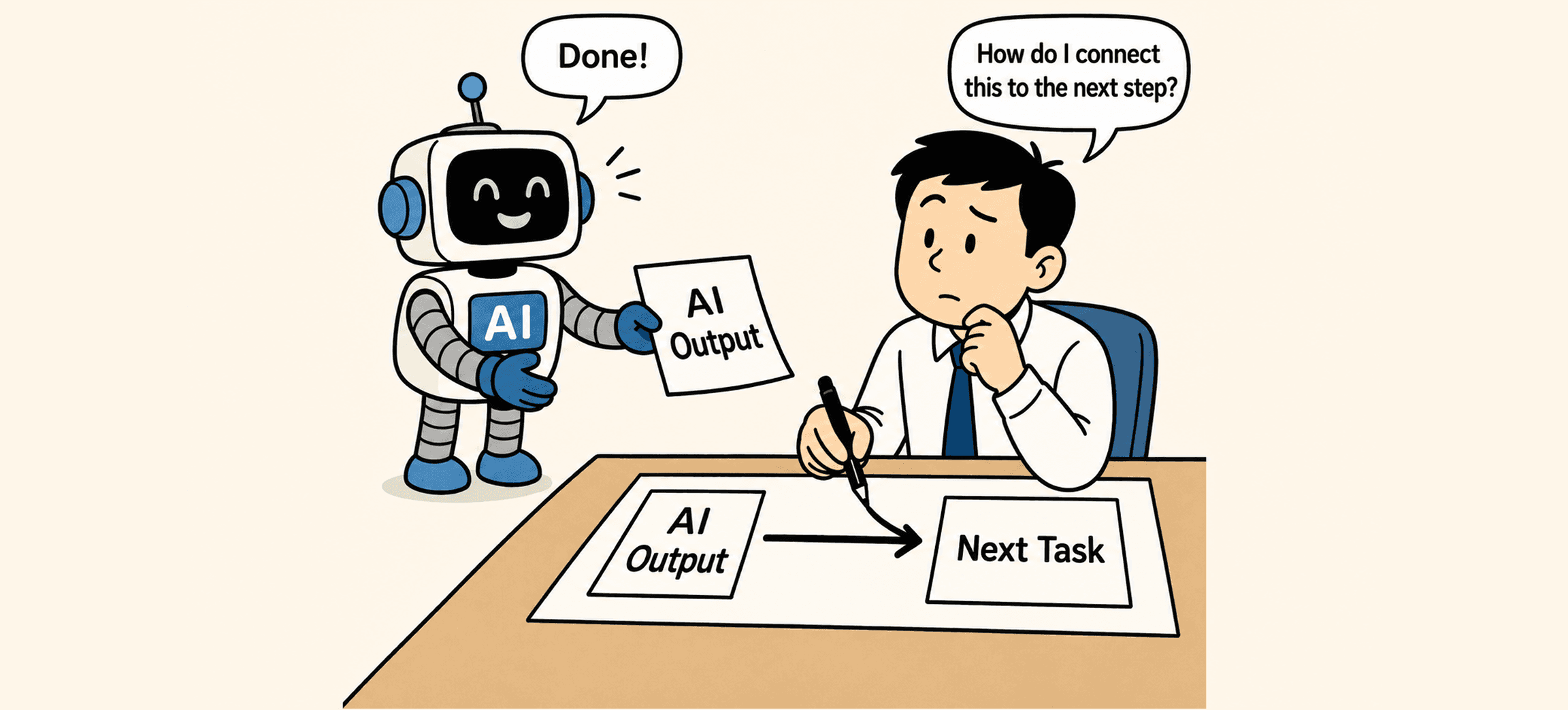
Using AI and changing how you work are two different problems. (Image: Generated with ChatGPT
AX — So What Do You Actually Get Out of It?
The results of AX, once it finally starts working, shouldn't be summed up as "work gets faster." AI is already making plenty of tasks faster — what matters most for AX is whether that speed turns into real outcomes.
The 5% of companies from the introduction — those with the capabilities to generate real value from AI — shared something in common: they integrated AI into core work, redesigned their workflows, and built up their data foundation and talent alongside it.
<Reference: The Widening AI Value Gap (Build for the Future 2025 Global Study>
Results come not when you merely use AI, but when AX begins — when AI is properly embedded in the flow of work.
So what actually changes when AX is done well?
The first thing that changes is clarity of judgment.
Thanks to AI-assisted documents, the information you need gets produced faster. But more information doesn't make judgment easier. Even with a summarized meeting record, if decisions aren't separated out, you have to read it all again. Even with dozens of customer feedback items organized, without priorities you can't tell what to do first — you just keep re-reading and re-organizing.
AX is what changes exactly this.
When AI's output is organized not as plain text but in the shapes work actually needs — decisions, items on hold, owners, next to-dos — people can see clearly what they need to judge, and direct AI accordingly.
And when what needs judging becomes clear, the speed of moving to the next task changes too. AI's quickly produced output becomes the starting point of the next task, so the next piece of work can begin right away.
Meeting notes become to-dos instead of mere records, customer feedback becomes requirements instead of mere opinions, and ideas become executable units of work instead of mere memos.
So to leap from AI adoption to AI transformation, you need to shift how you use AI in directions like these:
"Let's summarize meeting notes faster" ❌ → "Let's make meeting decisions flow into the PRD and next actions" ✅
"Let's write product plans faster" ❌ → "Let's get customer needs organized into feature specs and policy conditions" ✅
"Let's organize customer feedback faster" ❌ → "Let's make customer needs flow into requirements and feature priorities" ✅
"Let's organize ideas faster" ❌ → "Let's make ideas flow into feature specs and user flows" ✅
In the end, what AX reduces isn't just task time.
It reduces the cost of all the repeated work — people explaining the same thing again, understanding it again, and revising it again.
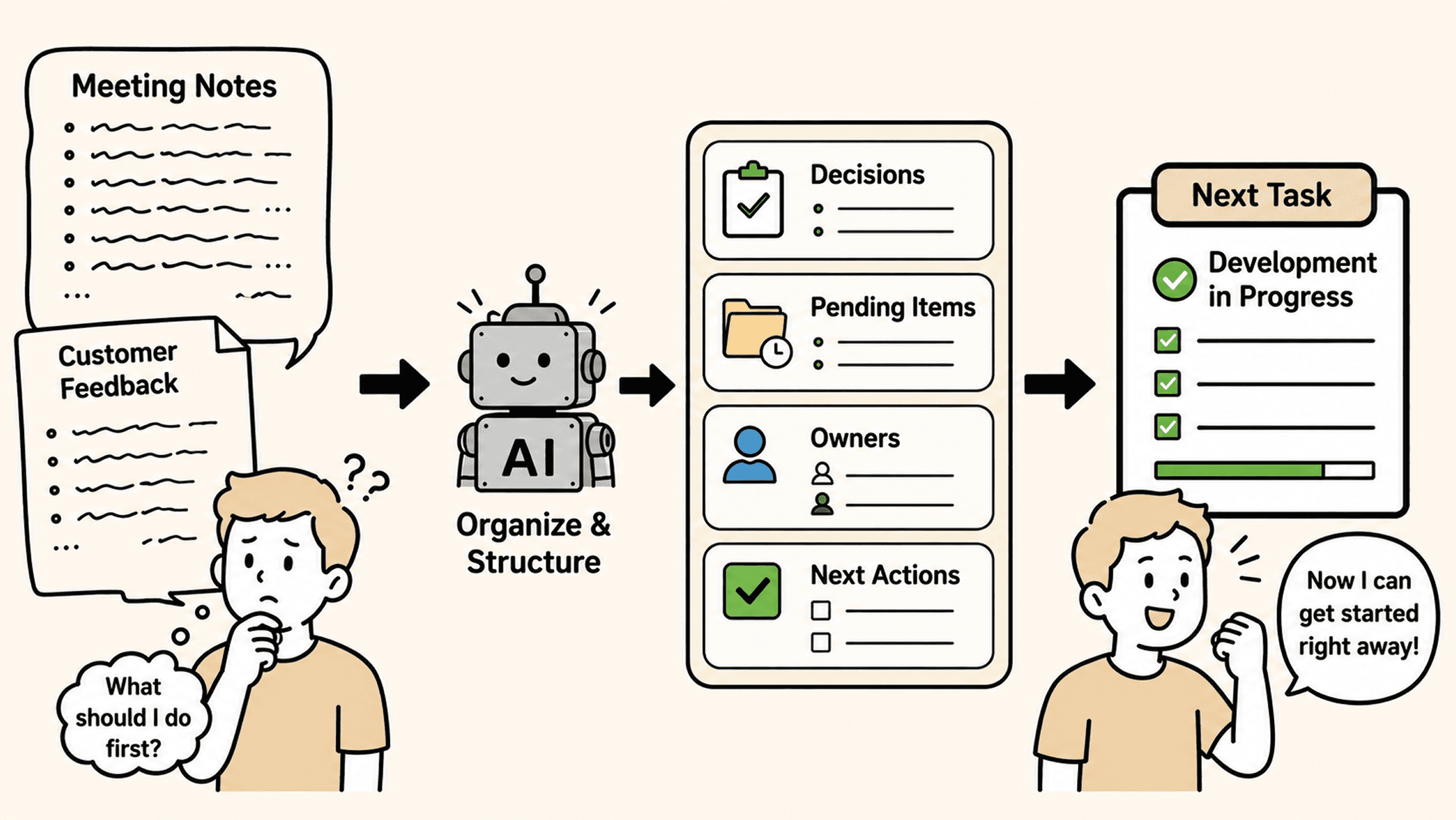
Only when AI is properly embedded in the workflow does the speed of work truly change. (Image: Generated with ChatGPT
4 Conditions for AI Output to Flow into the Next Task
Up to this point, AX might look like a question of "how well you use AI." But using AI well and having AI's output flow into the next task are entirely different problems.
Remember that team from earlier — the one whose meeting notes existed, yet Slack filled up the next day with "Did we actually decide to do this?"
Did that team throw away their meeting tool?
No. They kept the tool and changed four things. And those four things are precisely the conditions for AI to work inside a workflow: context, structure, judgment, and repetition.
1) Context: AI needs a baseline to refer to
This team's first problem was that AI only knew the contents of that meeting.
Which features were put on hold last meeting, what this quarter's goals are, which customer need started this discussion — AI doesn't know any of it. So when someone in the meeting says "Let's just go with what we discussed last time," the AI summary captures exactly that much:
'Agreed to proceed as discussed previously.'
And the reader ends up digging through last meeting's notes anyway.
So the team changed something: before having the tool summarize, they made it reference the previous meeting's decisions and held items, plus the planning documents in progress. The same remark then started getting summarized like this:
'Payment method addition: cards first as agreed last meeting; easy-pay options deferred to phase 2.'
What matters isn't feeding in more material — it's leaving behind the context AI needs and keeping that context from scattering. Meeting notes, customer feedback, and policy conditions mean more connected in one flow than they ever do sitting in separate places. Only then can AI produce output grounded in the team's actual situation.
2) Structure: It must be in a shape the next person can use
Even with context in place, one problem remained: the summary was well-written prose.
A summary that flows in paragraphs reads naturally, but for a developer to find "so what exactly am I building?", they have to read it start to finish. So the team locked in a format: no matter the meeting, the output must be split into four sections — Decisions / On hold / Owner / Next to-dos.
One format change, but the impact was big. The designer looked only at the Decisions section and started mocking up option A. The developer picked out only the items with their name in the Next to-dos section and created issues. People stopped reading the meeting notes — they just used them.
From an AX perspective, what matters isn't the volume of output but its structure. The same goes for product plans.
No matter how naturally a draft reads, if feature scope, policy conditions, and edge cases aren't separated out, the developer will just end up asking questions all over again.
3) Judgment: Good judgment for your team is still a human's job
But even the well-formatted meeting notes had a trap.
Sometimes what AI placed in the "Decisions" section wasn't actually decided in the meeting. AI had mistaken someone's strongly argued opinion for a consensus. If development had started on that basis, the team would have lost not just a few Slack questions but a week's worth of work.
So the team added one more rule: when the meeting notes are generated, the meeting lead spends five minutes reviewing just the Decisions section and confirms it. Until that confirmation, AI's output is a "draft" — only after it does it become the "baseline" the team acts on.
What judgment requires isn't prompt-writing skill.
It's the ability to understand why AI's output came out the way it did, interpret how far it can be trusted, and confirm it as the actual standard for work. You delegate to AI the things it does fast and well — but the role of turning that output into the team's standard stays with people.
4) Repetition: One good result must accumulate into the team's way of working
The last change was the quietest, but the biggest.
After a few weeks, data started accumulating for this team.
Which context made summaries better, which patterns the Decisions section kept getting wrong, which conditions developers still asked about even after reading the notes. If a developer asks "what about edge cases?" three meetings in a row, that's a signal to add an "Edge cases" section to the next meeting note format.
The team fed those signals back into their meeting note template and review checklist as they came up — so that good results became a format, not a coincidence.
Getting one good result from AI doesn't change how a team works. Only when you accumulate the reasons behind good results inside the team does AI stop being a one-off tool and start entering the team's way of working.
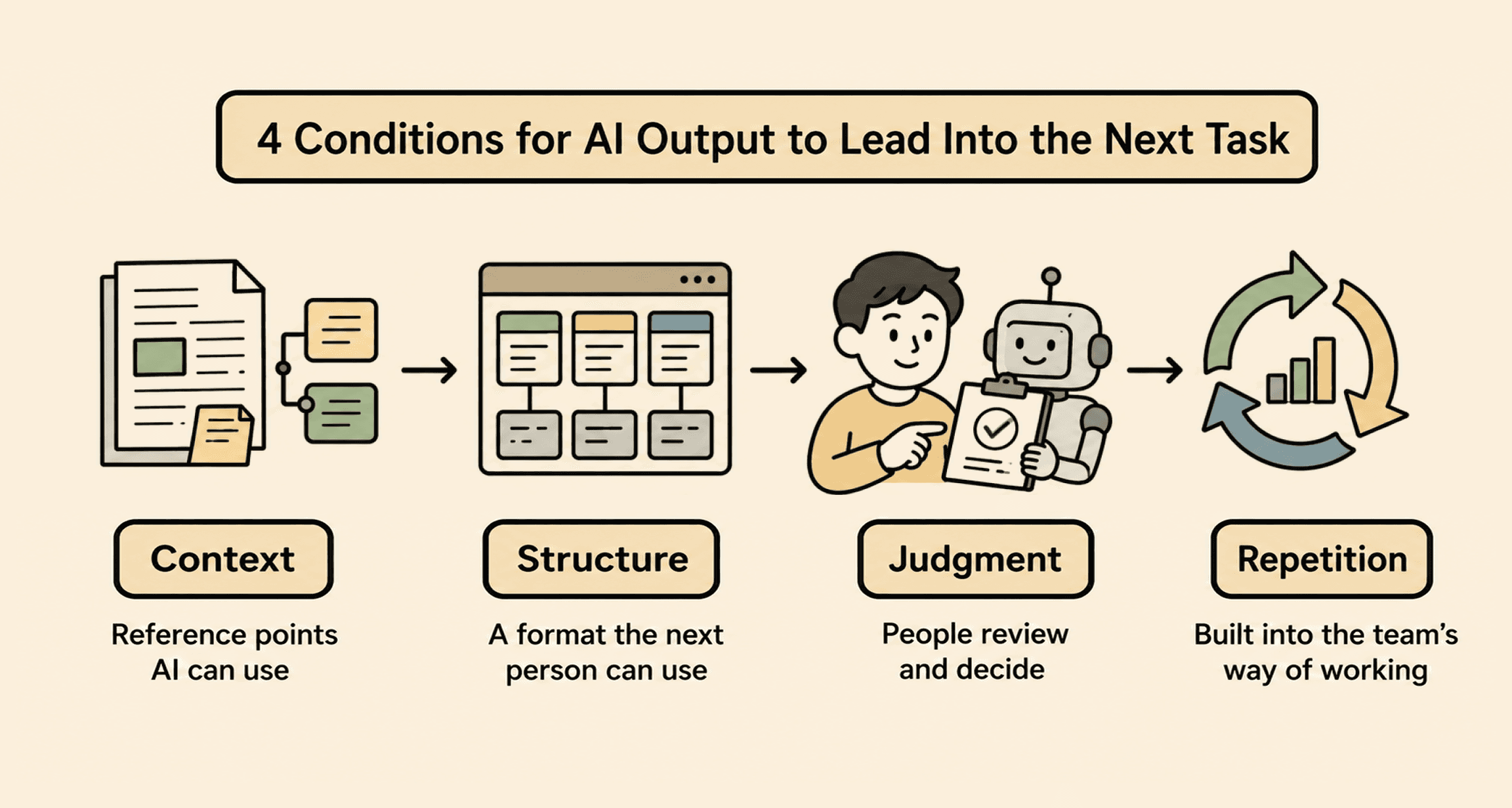
The 4 conditions for embedding AI in your workflow. (Image: Generated with ChatGPT
Leave behind the context AI can refer to
Shape the output into a usable structure
Have a human judge it and connect it to the next task
Repeat that method within the team
When these four move together, AI goes beyond being a tool that produces output — it becomes part of how you work.
AX Starts with Small Workflows
Reading this far, AX might feel like some massive organizational overhaul — but there's no need to think of it so grandly.
In practice, it can start with a very small workflow.
"Did this meeting get organized into clear next to-dos?"
"Is customer feedback being turned into proper requirements?"
"Is the AI draft in a state my teammates can actually use?"
If you build products, these questions probably sound familiar.
In product development, new information appears every day: customer feedback, ideas from meetings, feature requirements, screen flows, policy conditions, edge cases developers need to verify...
And it never gets organized all at once.
Ideas live in meeting notes, customer needs sit in CS tickets, feature scope is written in some separate document, and the fine-grained conditions are scattered across Slack and memos somewhere. You've probably faced that frustrating situation plenty of times.
What happens if, in that state, you tell AI: "Read all of this and write me a product plan"?
You might get a plausible draft — but the practitioner ends up asking questions like these:
"Which customer need did this part come from?"
"Did this reflect what we put on hold in the last meeting?"
"How detailed do the conditions need to be for a developer to implement this?"
And once again, a human has to grasp the context, connect the dots, and organize everything — the repeated work comes right back.
To avoid this inefficiency and have AI produce output you can use in the next task, the context AI refers to and the flow of the project have to be organized first.
What matters, in the end, is not making AI write — it's building a flow AI can work in.
This flow is exactly where Manyfast focuses.
Instead of stopping at organizing the scattered ideas, customer feedback, and meeting content of the product planning process, Manyfast makes them flow into requirements, feature specs, and user flows.
In the planning process of IT products, Manyfast:
Grasps scattered ideas and planning content in context
Structures requirements based on that context
Asks people the questions they need, building up criteria for judgment
Produces output in a form ready for the next task
In other words, it keeps your product plan from ending as a pile of ideas, a feature list, or screen sketches. It turns the plan into a baseline the product planner can judge against — a planning flow that becomes the starting point for the team's next task.
Of course, Manyfast alone can't design and complete an entire organization's AX.
But if your product team is feeling the problem of "AI output that never flows into the next task," I'm confident it can be a great starting point for changing your planning flow.
Wrapping Up
In the end, AX is closer to redesigning the flow of work so that AI's output flows into the next task — without a human having to re-organize it.
The starting point doesn't have to be a grand transformation.
Whether your meeting notes are flowing into next to-dos.
Whether customer feedback is being organized into requirements.
Whether AI drafts are becoming a baseline your teammates can use right away.
You can start with small questions like these.
Ultimately, it comes down to one thing:
"Can AI's output let you move quickly into the next task?"
To answer this question, you need to leave behind the context you'll hand to AI, shape its output into a usable structure, have people judge it and set the standards, and repeat that method until it accumulates within the team.
That's when AI moves beyond being a tool that makes output — and starts entering how your team works.
If your scattered ideas and requirements aren't flowing into the next task, start by organizing your planning flow in Manyfast.
Organize a planning flow that runs all the way from PRD and feature specs to user flows and wireframes
👉 manyfast.io
Back to list
